Search 45,000 Maryland opinions by meaning, read with color highlights and notes, see what
each case relied on, ask questions with cited answers, and chat with any opinion — all in one workspace.
Every reported Maryland appellate opinion, searchable by meaning — with a reader, highlights,
notes, and projects. Your research and your record live in one tool, so the case you find is a
click from the brief you're citing it in. No separate research subscription.
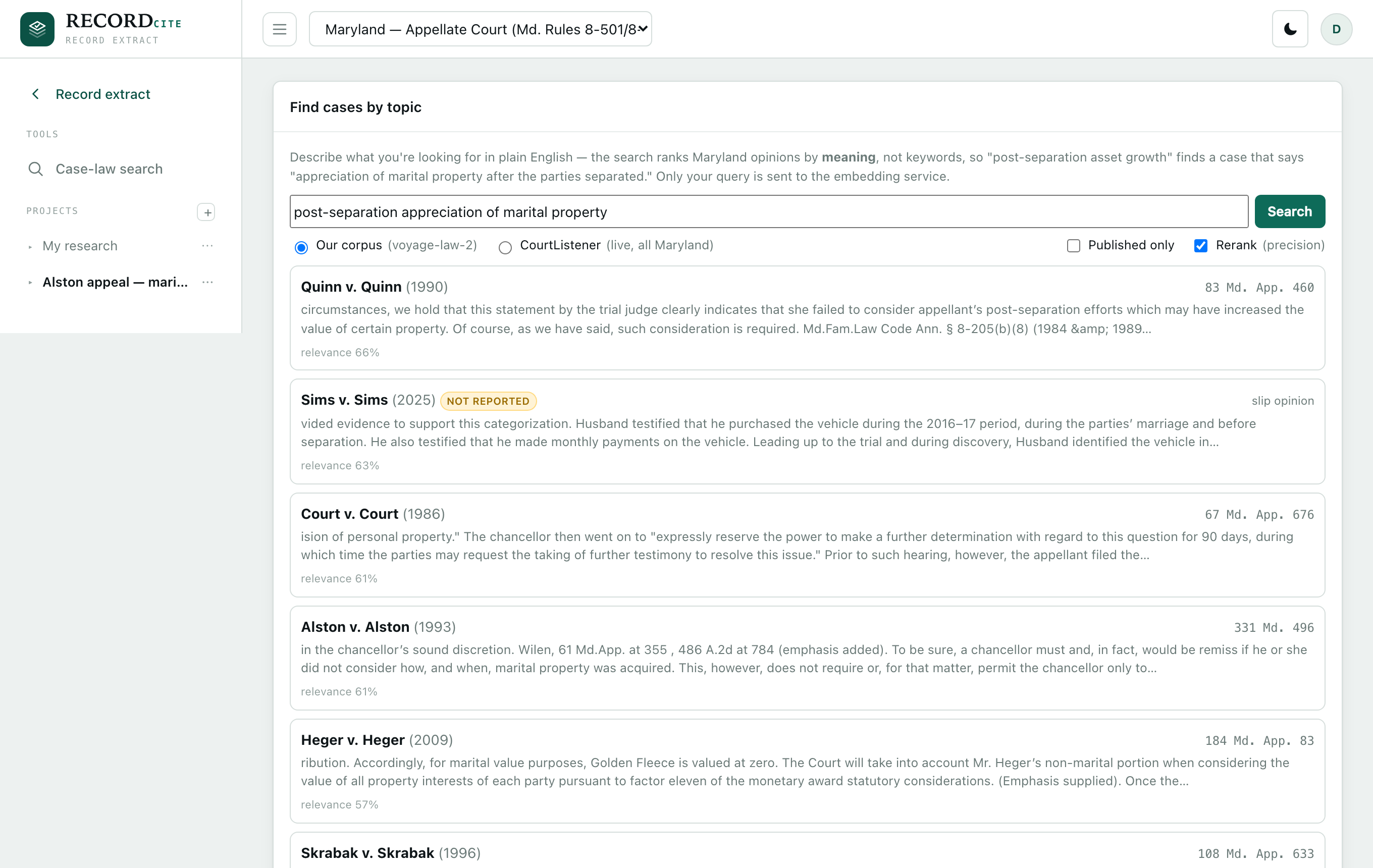
Natural-language search
Describe the issue. Find the case.
Search the whole Maryland corpus by meaning, not keywords — "post-separation appreciation of
marital property" surfaces the right opinion even when it phrases the point differently.
Ranked by a legal-domain embedding model, with an optional cross-encoder rerank for precision.
Semantic search across every reported Md. and Md. App. opinion
Restrict to published authority, or query CourtListener live
Exact quote & citation search across the corpus, too
recordcite.com
Reader & highlights
Read, highlight, and keep it.
Open any opinion in a clean, page-faithful reader. Highlight passages in five colors — saved to
your account and repainted every time you reopen the case, in page or full-text view. Copy a
passage with its citation in one click, resize the text, or export the opinion to PDF with your
highlights intact.
Persistent, color-coded highlights that survive across sessions
Copy-with-citation, adjustable text size, and AI case summaries
Export to PDF — highlights and all
recordcite.com
Citator
See exactly what each case relied on.
"Cited by" lists every later opinion that cites the one you're reading — and, for each, the
precise passage it pincited, not just the citation string. Jump straight to that page.
Authorities and the opinion's most-cited pages are always one click away.
Every citing case, with the exact pincited passage it relied on
One-click jump to the pincited page in the opinion
Table of authorities + most-cited-pages heat map
recordcite.com
Research notes
Notes that follow the whole matter.
A movable notes window floats over any case and spans every case you open — it isn't tied to one
opinion. It autosaves as you type, and you can keep multiple named notes and switch between them
without losing your place.
Draggable, resizable, and available on every case
Multiple named notes, autosaved
Notes live in your project, next to the cases they're about
recordcite.com
Projects
Organize everything into projects.
Group saved cases and notes into named project folders — one per matter. Each saved case shows
its highlighted passages as a digest, so a project reads like a research memo at a glance — then
export it to Word in one click.
Favorite cases into a project; a case can live in several
Per-case highlight digest, plus notes, in one place
One-click Word research-memo export per project
recordcite.com
Security & privacy
Built for privileged material.
A record extract is client work product, often sealed. RecordCite is designed so it never holds on to your
documents — and so one firm can never reach another's data.
Processed, then deleted
Documents are uploaded over an encrypted connection, processed on demand, and deleted
automatically after a short window — or the moment your extract is built. Only the extract's
structure — the order, tagging, and page ranges — is retained; the pages themselves are not, and
nothing is ever used to train anything. Reopen a matter later and just re-add the files — each
re-links to your saved order, tagging, and stamps by content fingerprint, so nothing is re-done.
Every firm walled off
Each firm's matters, settings, and files are fully isolated from every other firm's. One
client can never see — or reach — another's work.
Encrypted and access-controlled
Passwords and any saved keys are encrypted at rest with industry-standard cryptography, and
sign-up can be closed during a private rollout so only people you invite get in.
Contact
Get in touch.
Questions, a demo, or access for your firm — email
[email protected],
or send a note and we'll get back to you.